Institute కి రండి | Demo వినండి | Decide అవ్వండి. ( Online Class Available )
Free Google AdWords Tutorials - Google Ads Types & Process 2026
Google Ads is an important part of digital marketing. In this blog, Free Google AdWords Tutorials in 2026, you will learn what Google Ads is and how it helps businesses. You will also find a step-by-step guide on how to create and run a Google Search Ad campaign.
Free Google AdWords Tutorials 2026! Learn Google Ads types & processes step-by-step. Perfect for beginners & marketers. Download the PDF now and start creating successful ad campaigns today.
Editor's Note
Author: D.V. Ravi Varma
Digital Marketing Expert & Lead Instructor
16+ Years Experience
Reviewed by: D.V. Ravi Varma
Last Updated: 3/14/2026
Welcome to the Free Google Ads Tutorial 2026! In this article, I’ve highlighted key strategies like Performance Max and Smart Campaigns — explaining how they work and how businesses can use them effectively. This article is regularly updated to reflect the latest Google Ads trends, ensuring you get accurate and actionable insights
Follow me on social media
Free Google Adwords Tutorial - Google Ads for Beginners 2026
Google Ads is an Google online advertising platform where advertisers have to pay to display their Ads on Google Search Engine Results Page and other Google partner websites. It is also known as Paid Ads.
Free Google Ads Tutorial – Google Ads for Beginners (2026)
Google Ads is Google’s online advertising platform that allows businesses to promote their products or services across Google Search results and its partner websites. Advertisers pay to display their ads on Google Search Engine Results Pages (SERPs) and other Google-owned platforms. This model is commonly referred to as Paid Advertising.
How Google Ads Works in 2026
Google Ads operates on an auction-based system. Every time a user searches for something on Google, an ad auction takes place.
The position of your ad depends on three key factors:
- Keyword relevance
- Quality Score
- Bidding strategy
Based on these factors, Google decides which ads appear on the search results page and in what order.
Google Ads Networks
Google Ads runs across two primary networks:
1. Search Network
The Search Network displays ads on Google Search results pages (SERPs) and other Google-owned search platforms such as Google Maps, Google Play, and partner search sites.
2. Display Network
The Display Network shows visual and text ads across millions of websites, mobile apps, YouTube, Gmail, and other Google partner platforms, helping businesses reach users beyond search.
Google Ads Tutorials – Types of Google Ads
Different Types of Google Ads Google Ads:
1. Text Ads: Text ads are displayed on Google Search Engine Results Pages (SERPs). These ads are designed to promote products or services using a headline and description, helping businesses reach users who are actively searching for related keywords.
2. Text Ads with Extensions: These are enhanced text ads that include additional information such as phone numbers, site links, call buttons, and location details. Ad extensions improve visibility and increase click-through rates by giving users more reasons to engage with the ad.
3. Responsive Search Ads: Responsive search ads automatically adjust their headlines and descriptions based on the user’s device (desktop, mobile, or tablet). Google tests different combinations of headlines and descriptions to show the best-performing version for each search query.
4. Responsive Display Ads: These ads appear across the Google Display Network. Advertisers upload images, headlines, and descriptions, and Google automatically adjusts the ad size, format, and appearance to fit different websites and apps.
5. Shopping Ads: Shopping ads display product images, prices, brand names, and offers directly in search results. These ads are commonly used by e-commerce businesses and help users compare products before making a purchase.
6. Image Ads: Image ads appear across websites, mobile apps, and platforms within the Google Display Network. These visually engaging ads help businesses increase brand awareness and reach a wider audience.
7. App Promotion Ads: App promotion ads are used to promote mobile applications. These ads help drive app installs and engagement and can appear across Google Search, the Google Display Network, YouTube, and Google Play Store.
8. Call-Only Ads: Call-only ads are designed to encourage users to call a business directly. When users click on the ad, it initiates a phone call instead of directing them to a website, making it ideal for service-based businesses.
9. Rich Media Ads: Rich media ads go beyond standard text and image formats. They include interactive elements such as animations, videos, and expandable features, helping advertisers deliver a more engaging user experience.
10. Dynamic Search Ads: Dynamic search ads automatically generate ad headlines based on the content of your website. These ads are useful when your website has a wide range of products or services, as Google dynamically matches search queries with relevant landing pages.
11. Product Shopping Ads: Product shopping ads showcase products with images, prices, brand details, and offers. These ads are ideal for eCommerce businesses and appear on Google Shopping, Google Search, and partner websites, helping users compare products before purchasing.
If you need any help with Google Ads, you can check out the Google Ads Help Center.
Google Ads Extensions
1. Structured Snippet Extensions: Structured snippet extensions highlight specific aspects of your product or service using predefined headers such as services, features, or brands. They give users more context and help increase ad relevance and engagement.
2. Sitelink Extensions: Sitelink extensions display additional clickable links below your main ad, directing users to specific pages like services, offers, or contact pages. When users click a sitelink, they are taken directly to the selected landing page.
3. Callout Extensions: Callout extensions allow you to add short descriptive text to your ads, such as key benefits or unique selling points. These extensions help highlight important information like offers, experience, or services without adding extra links.
4. Location Extensions: Location extensions display your business address, phone number, and map location. They help users easily find your physical store or office and are especially useful for local businesses.
5. Call Extensions: Call extensions show a clickable phone number in your ad. When users click the call button, they can directly contact your business, making it ideal for service-based and lead-driven campaigns.
6. Mobile App Extensions: Mobile app extensions promote your mobile application by including an install or open link within your ad. Users can download the app or open it directly from the ad on supported devices.
7. Price Extensions: Price extensions showcase the price of your products or services directly in the ad. They help users understand your offerings upfront and are commonly used for e-commerce and service-based businesses.
8. Promotion Extensions: Promotion extensions highlight special offers, discounts, or limited-time deals. These extensions are effective for attracting customers who are actively searching for offers related to your products or services.
How to Set Up Your First Google Ads Campaign in 2026
Google Ads Cost Models
CPM (Cost Per 1,000 Impressions): You pay for every 1,000 times your ad is shown, commonly used for brand awareness campaigns.
vCPM (Viewable Cost Per 1,000 Impressions): You pay only when your ad is actually viewable to users, improving visibility-focused advertising.
CPC (Cost Per Click): You pay only when someone clicks on your ad, ideal for driving traffic to your website.
CPV (Cost Per View): You pay when users watch or interact with your video ad, mainly used for YouTube campaigns.
CPA (Cost Per Action/Acquisition): You pay when a user completes a specific action, such as a purchase, sign-up, or submission of a lead form.
Important Google Ads Terms You Should Know
Impressions: The total number of times your ad is displayed to users.
Clicks: The count of how many times an ad is clicked by users.
Click-Through Rate (CTR): The percentage of users who click your ad after seeing it, calculated as (Clicks ÷ Impressions) × 100.
Cost: The total amount spent on your Google Ads campaign.
Conversions: The number of times users complete your defined campaign goal, such as a purchase or lead submission.
Conversion Value: The total value assigned to all conversions based on your tracking setup.
Cost per Conversion: The average cost required to generate one conversion, calculated as (Total Cost ÷ Total Conversions).
Conversion Rate: The percentage of clicks that result in conversions, calculated as (Conversions ÷ Clicks) × 100.
Return on Ad Spend (ROAS): Measures campaign profitability, calculated as (Conversion Value ÷ Total Ad Cost).
Types of Keywords in Google Ads
- Impressions: The total number of times your ad is displayed to users.
- Clicks: The count of how many times an ad is clicked by users.
- Click-Through Rate (CTR): The percentage of users who click your ad after seeing it, calculated as (Clicks ÷ Impressions) × 100.
- Cost: The total amount spent on your Google Ads campaign.
- Conversions: The number of times users complete your defined campaign goal, such as a purchase or lead submission.
- Conversion Value: The total value assigned to all conversions based on your tracking setup.
- Cost per Conversion: The average cost required to generate one conversion, calculated as (Total Cost ÷ Total Conversions).
- Conversion Rate: The percentage of clicks that result in conversions, calculated as (Conversions ÷ Clicks) × 100.
- Return on Ad Spend (ROAS): Measures campaign profitability, calculated as (Conversion Value ÷ Total Ad Cost).
Types of Keywords in Google Ads (2026)
1. Broad Match: Broad match helps you reach a wider audience by showing ads for related searches, including synonyms, variations, and intent-based queries—even if the exact keyword is not used.
In 2026, Google’s AI uses user intent, search behaviour, and context to improve broad match accuracy, making it effective for discovery and scaling campaigns.
2. Broad Match Modifier (Legacy Concept): Broad Match Modifier (BMM) is no longer used as a separate match type. Its behaviour has been fully integrated into Phrase Match.
In 2026, phrase match covers keyword intent while allowing flexibility, replacing the need for manual modifiers.
3. Phrase Match: Phrase match shows ads when searches include the meaning of your keyword phrase. Word order can vary, but intent must match.
This match type balances reach and relevance and is widely used for performance-driven campaigns with smart bidding.
4. Exact Match: Exact match triggers ads for searches that closely match the exact keyword meaning.
Although more flexible than earlier versions, exact match still delivers high relevance and is ideal for targeting users with strong purchase or conversion intent.
5. Negative Keywords: Negative keywords prevent your ads from appearing for irrelevant or unwanted searches.
They help improve ad relevance, reduce wasted spend, and increase overall campaign efficiency by filtering out low-quality traffic.
Google Ads Campaign Types (2026 Updated)
1. Search Campaigns: Search campaigns display text ads on Google Search results pages (SERPs) when users search for keywords related to your products or services.
These campaigns are ideal for capturing high-intent users who are actively looking to buy, compare, or enquire. Search campaigns focus on driving website traffic, leads, and conversions.
2. Display Campaigns: Display campaigns show visual ads (images, banners, and responsive ads) across the Google Display Network, which includes millions of websites, apps, and platforms.
These ads help businesses reach users while they browse content online and are mainly used for brand awareness, remarketing, and audience expansion.
3. Search with Display Expansion (Smart Reach): This campaign type allows your search ads to appear on both search and select display placements using Google’s AI.
It helps increase reach beyond search while maintaining intent-based targeting and is useful for advertisers looking to scale visibility efficiently.
4. Video Campaigns: Video campaigns show ads on YouTube and Google video partner platforms.
Ad formats include skippable in-stream ads, non-skippable ads, in-feed video ads, bumper ads, and Shorts placements.
Video campaigns are effective for brand awareness, engagement, and storytelling at scale.
5. Shopping Campaigns: Shopping campaigns display product details such as images, prices, brand names, and offers directly in Google Search and Shopping results.
These campaigns are best suited for eCommerce businesses and help users compare products easily before making purchase decisions.
6. App Campaigns: App campaigns promote mobile applications across Google Search, Display, YouTube, Google Play, and Discover.
Google automatically optimises ad creatives, targeting, and bidding to drive app installs, in-app actions, and engagement.
7. Performance Max Campaigns: Performance Max is a fully automated campaign type that allows advertisers to access all Google Ads inventory from a single campaign.
Using machine learning, it optimizes targeting, bidding, creatives, and placements across Search, Display, YouTube, Gmail, Discover, and Maps based on your conversion goals.
This campaign type is ideal for driving sales, leads, and omnichannel growth.
8. Smart Campaigns: Smart campaigns are designed for small businesses looking for a simple and automated way to advertise online.
Google handles ad creation, targeting, and bidding based on your business goals, making it suitable for beginners and local service providers.
9. Local Campaigns (Now Integrated with Performance Max): Local campaigns allow businesses to drive foot traffic to physical locations such as stores, offices, or service centers.
Ads appear across Google Search, Maps, YouTube, Display, and Discover to help customers find directions, call your business, or visit your location.
These campaigns are ideal for increasing store visits, local visibility, and walk-in conversions.
These blog is about Free Google Adwords Tutorial. If you want to learn Google Ads, Ravi Varma is one of the best Google Ads Certification Course trainer in Hyderabad with 12 + years of Industry Experience.

Search Ads: From Basic to Advanced
Search ads appear on Google Search results pages when users search for keywords related to a product or service. These ads help businesses reach people at the exact moment they are actively looking for solutions, making search ads one of the most effective formats for driving leads and conversions.
Here I Can explain how Search Ads work and why they are so powerful.
Search ads work across Google Search and selected partner search networks, allowing advertisers to target high-intent users with relevant messaging.
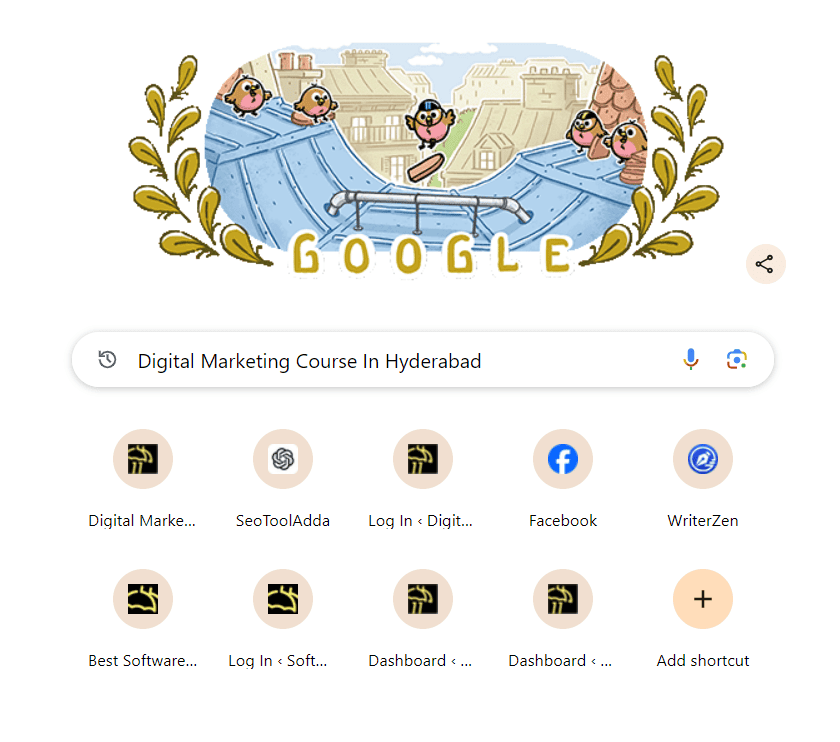
People type keywords in Google search bar and Google shows the search results.
According to my search Digital Marketing Course In Hyderabad it shows the below results.
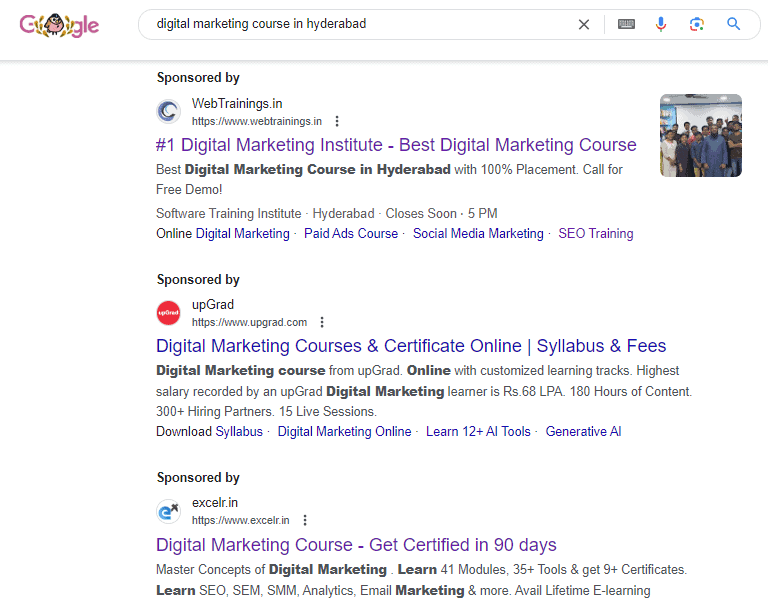
Look closely it shows Ad in the front of the URL. It means that someone paid to appear here on the first page of Google when someone types the Digital Marketing course in the Hyderabad keyword.
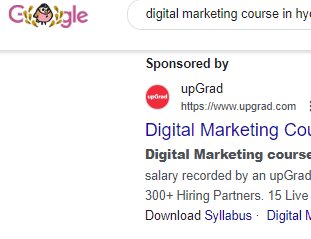
In the search engine results page 2 and 3 results also showing ads, they are also paying to show their ad for the same keyword.
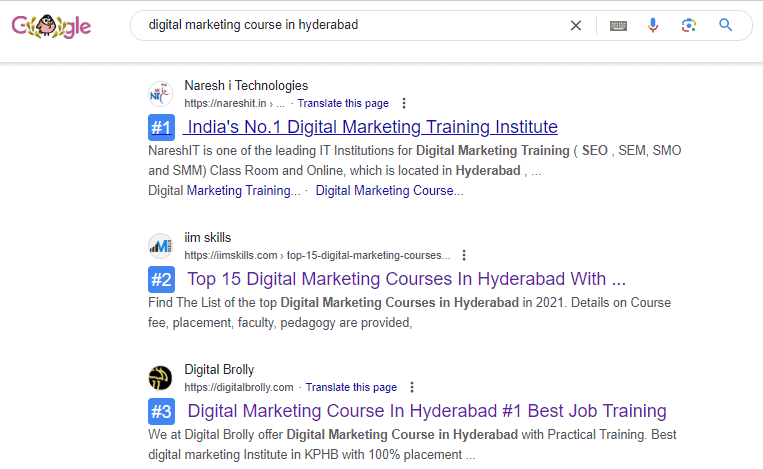
Below the Ad results there are websites shown number wise that are called organic search results, they didn’t pay to appear on the search results. Google thinks the keyword is more relevant and shows this website organically.
What Happens When Someone Clicks on an Ad?
When a user clicks on a Google ad, they are taken to the advertiser’s website or landing page related to the product or service being promoted. If the user finds the offer useful, they may choose to make a purchase, sign up, or enquire about the service.
For the advertiser, each click comes with a cost. Google Ads follows a pay-per-click (PPC) model, which means advertisers pay only when someone clicks on their ad.
The cost of each click is determined by the advertiser’s bid and Google’s ad auction factors, such as competition, ad quality, and relevance.
Simple Example:
Assume an advertiser bids ₹100 per click for the keyword “Digital Marketing Course in Hyderabad.”
- If the ad receives 100 clicks, the total ad spend will be ₹10,000.
- Out of those 100 visitors, if one person enrols in the course and pays ₹20,000, the advertiser earns a profit even after ad costs.
This shows how effective Google Ads can be when the right audience, strong offers, and quality services are combined.
Key Takeaway
Successful Google Ads campaigns focus on:
- Relevant keywords
- High-quality ads
- Strong landing pages
- Valuable products or services
Advantages of Google Ads
Google Ads helps businesses reach potential customers exactly when they are searching for related products or services. Your ads appear based on relevant keywords, ensuring high visibility to users with clear intent.
Ads are shown according to the buyer’s search intent, which means the right message reaches the right audience at the right time.
Google Ads allows precise targeting, helping businesses display their ads in the most relevant places and moments, increasing the chances of clicks and conversions.
Campaign performance can be monitored and controlled in real time. Advertisers can pause or resume campaigns, adjust budgets, modify targeting, and optimise ads at any time to improve results.
According to the buyer’s intent of the specific keyword the ad displayed.
It targets the people with the right ad at the right place at the right time.
You can analyze the campaign by pause and play option and make changes in budget and other settings.
How to Create a Paid Search Ad Campaign
To get started, type “Google Ads” into the Google search bar and click the official Google Ads website.
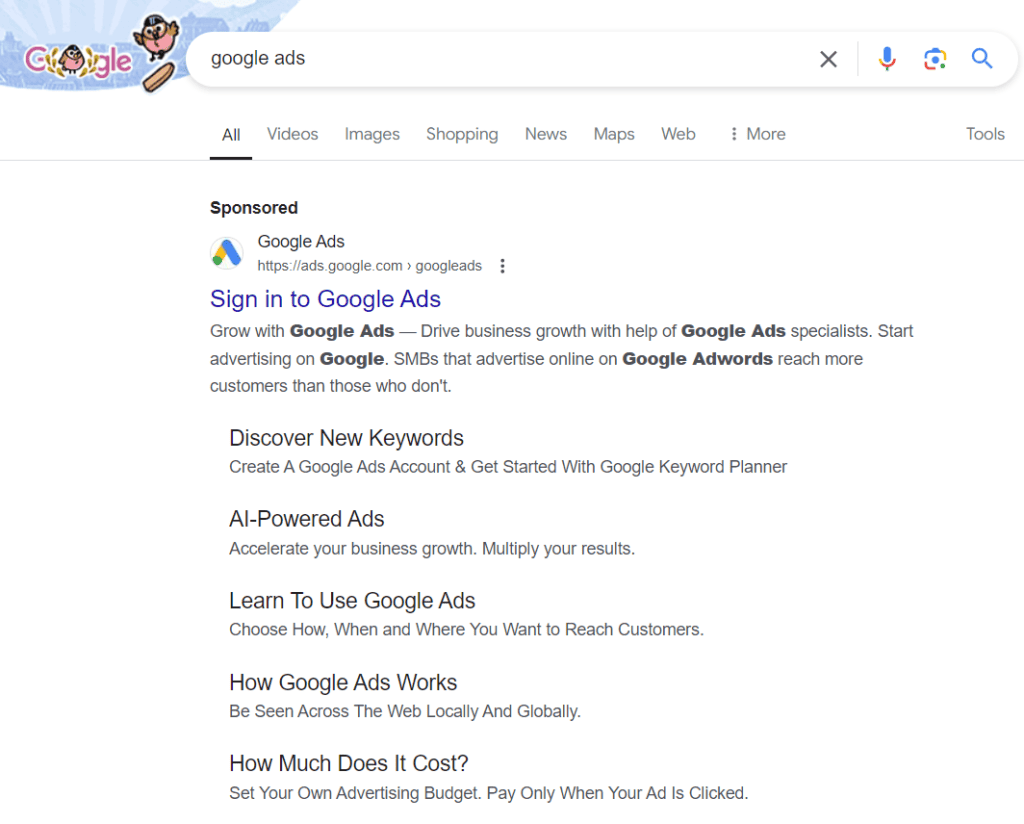
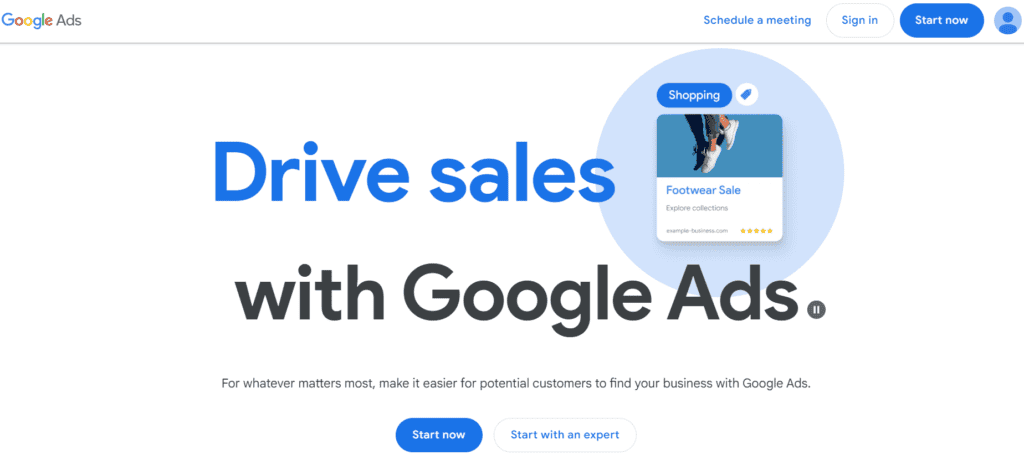
Go to the Google Ads homepage and log in using your Google account. If you are a new user, create an account to proceed. Once signed in, Google may walk you through a brief setup tailored to your advertising objectives. To access full campaign features, scroll down and select “Switch to Expert Mode.”
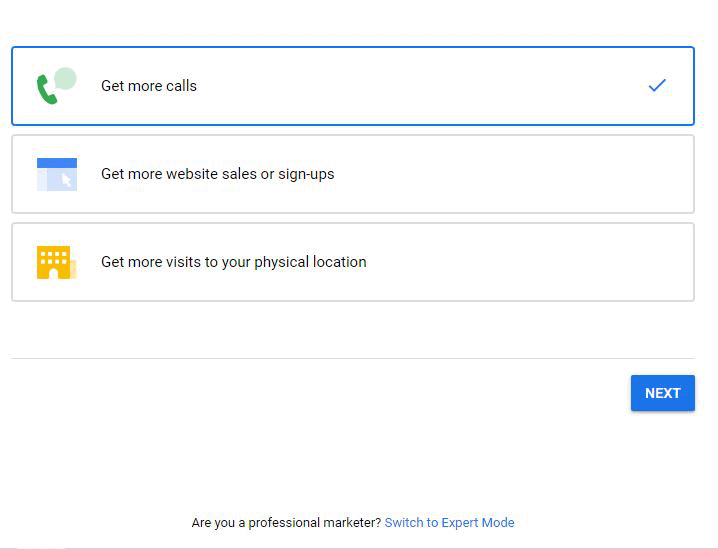
Expert Mode gives you complete control over campaign settings, bidding options, targeting, and ad formats—making it ideal for creating professional search ad campaigns.
From here, you can proceed to set up your paid search campaign by choosing your campaign goal, defining your audience, selecting keywords, setting budgets, and creating your ads.
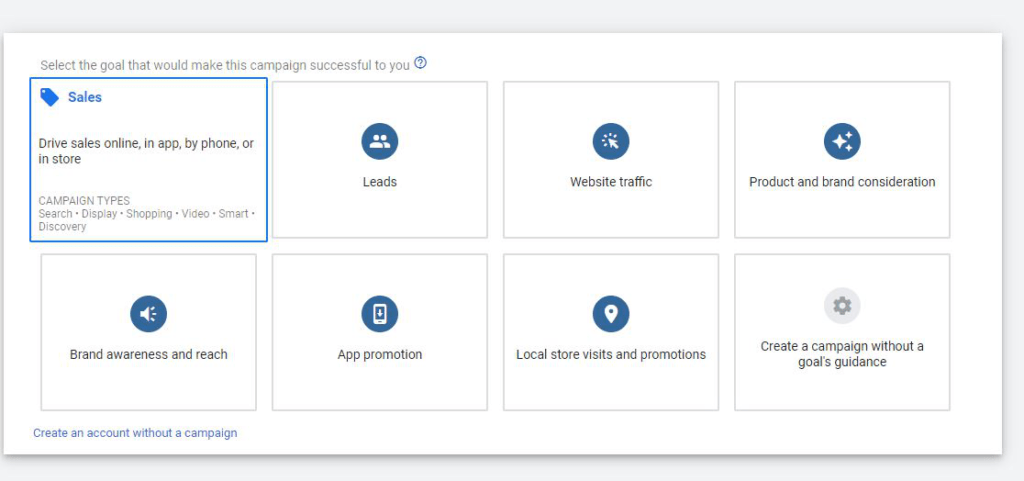
For example, if your objective is to generate more leads for your business, select the Leads goal. If your business focuses on selling products or services, you can choose goals related to Sales or Conversions.
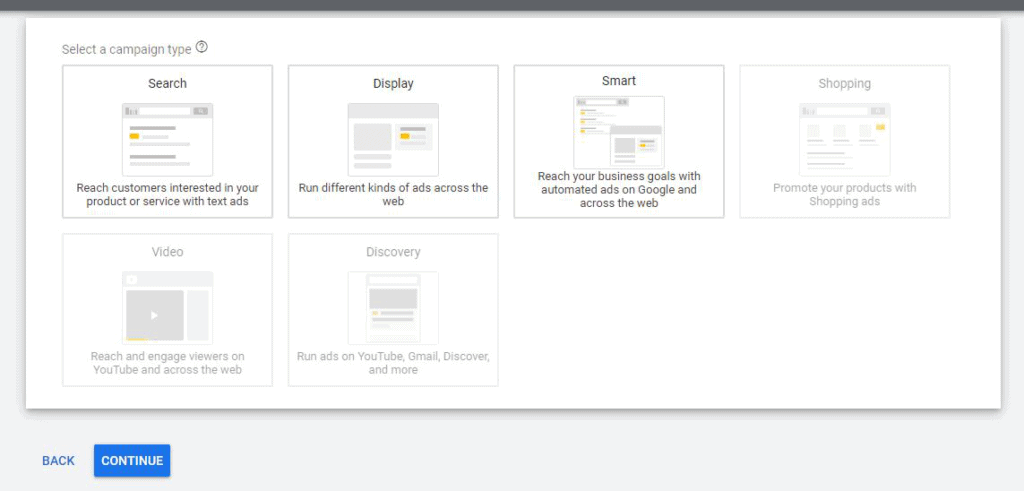
After selecting the leads option, proceed to choose the campaign type. For lead generation, select a Search Campaign to capture users who are actively searching for your services.
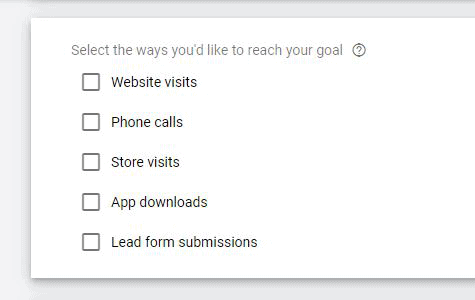
Next, Google will ask how you want to achieve your goal. You can choose options such as:
- Website visits
- Phone calls
- Store visits
- App downloads
- Lead form submissions
Select the option that best aligns with your business objectives.
Setting Up Conversion Tracking
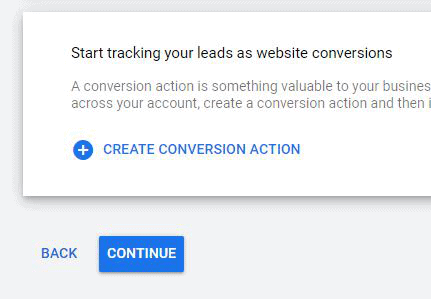
To track how many leads or conversions you receive, you need to create a conversion action. Conversion tracking allows Google Ads to measure user actions such as form submissions, calls, or purchases.
Once the conversion action is set up, Google will automatically track and display your leads and conversions within the dashboard.
Click Continue to move to the next step.
Campaign Setup Process
Your Google Ads campaign is created through four key steps:
- Configure campaign settings
- Set up ad groups
- Create ads
Complete billing setup
Step 1: Select Campaign Settings
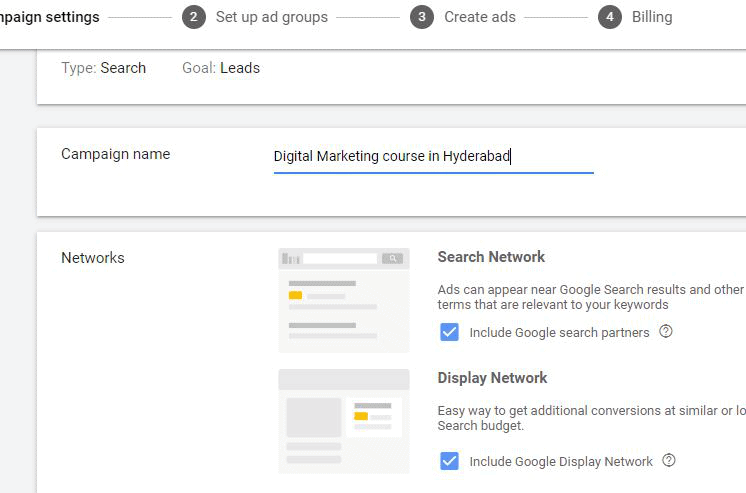
Campaign Name- Digital Marketing course in Hyderabad
Select Networks
Choose where you want your ads to appear:
- Search Network:
Enable this option if you want your ads to appear on Google Search and partner search websites. - Display Network:
Enable this option if you want your ads to appear across websites, apps, and platforms within the Google Display Network.
If your goal is only to show ads on Google Search, select Search Network only and disable Display Network.
Additional Campaign Settings (Optional)
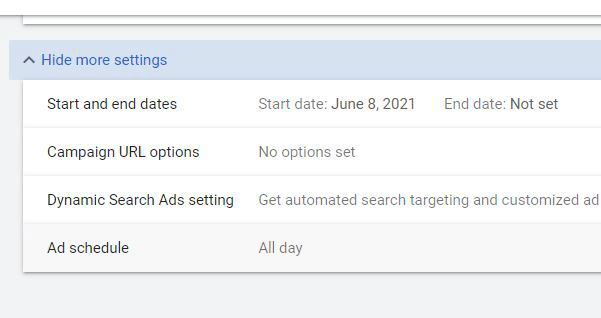
You can expand advanced settings if needed:
- Start and End Dates: Schedule when your campaign should begin and stop
- Campaign URL Options: Track performance using custom URLs
- Dynamic Search Ads Settings: Enable if you want Google to match ads automatically based on website content
- Ad Schedule: Choose specific days and times for your ads to run
These settings are optional and can be adjusted later.
Location Targeting
Choose where you want your ads to appear :
- All countries and territories
- Specific regions or cities
- Enter a custom location
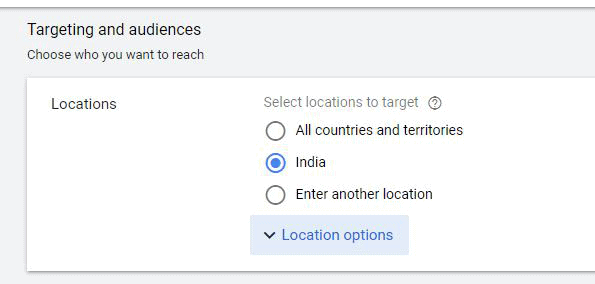
If your business operates in a specific city, target that location only.
Example: If you want your ads to appear only in Hyderabad, select Hyderabad, Telangana, India to ensure your ads reach the right audience.
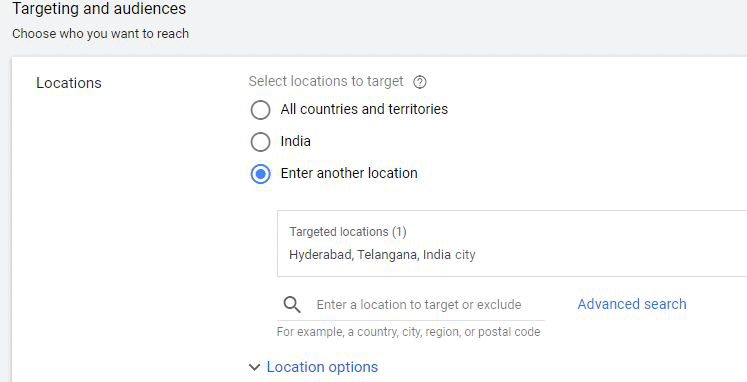
You can add multiple locations to your campaign. Your ads will be shown only in the locations you select.
Radius Targeting
Radius targeting allows you to show ads within a specific distance around a chosen location.
For example, if you want your ads to appear within 5 km around KPHB, Hyderabad, select the centre location and define the radius in kilometres or miles. Google will display your ads only to users within that selected area.
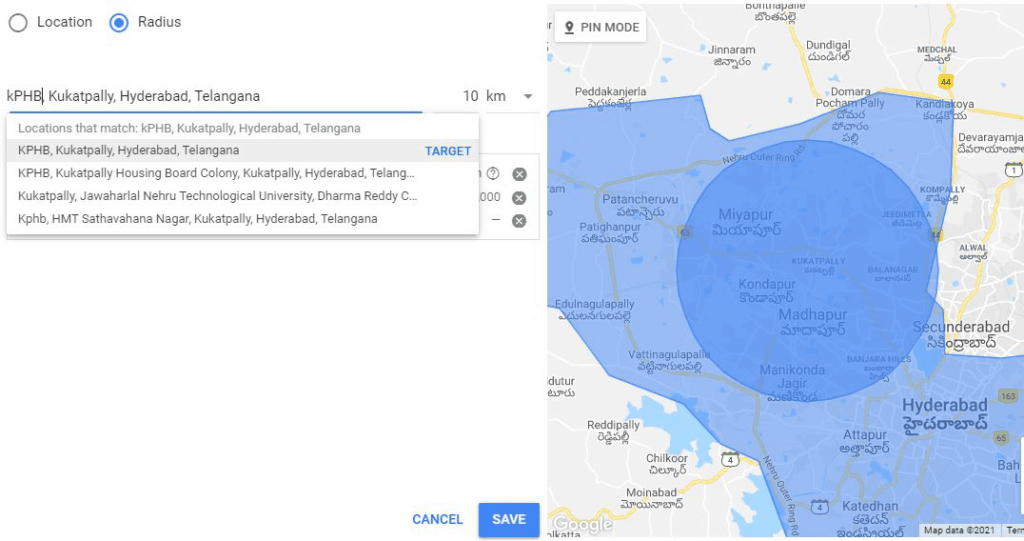
Radius targeting is especially useful for local businesses such as restaurants, clinics, gyms, pharmacies, and service providers.
Location Options
Targeting Options
You can choose how your ads reach users based on location:
- People who live in or often visit your chosen locations (recommended).
- People in your targeted locations
- People searching for your targeted locations
For most campaigns, selecting the first option is recommended, as it ensures your ads reach users who are physically present in or frequently visit the target area.
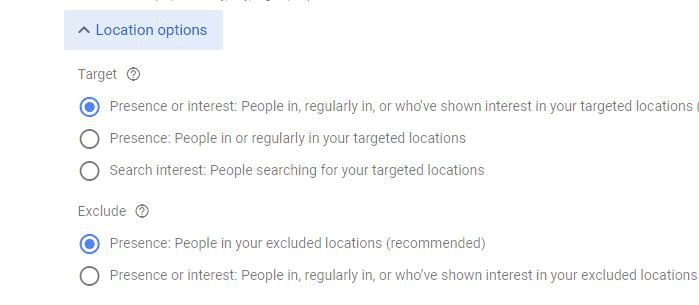
Exclude Locations
You can also exclude specific locations from seeing your ads:
- People in or regularly in excluded locations
- People in your excluded locations
This helps prevent your ads from appearing in areas that are not relevant to your business.
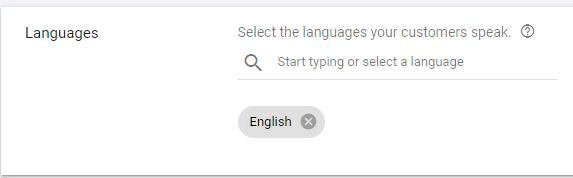
Language Targeting
Choose the language spoken by your target audience.
By default, English is selected, but Google Ads supports multiple languages, including regional and local language options.
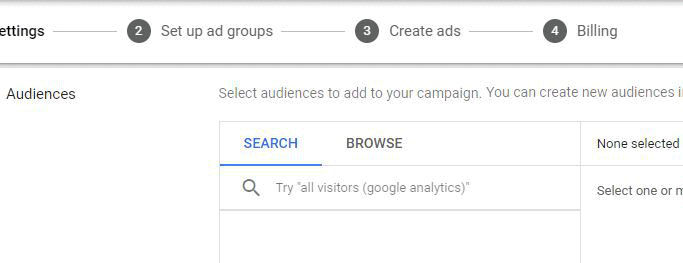
Audience Selection
Based on your campaign objective, you can choose the right audience for your ads.
Audience Targeting Options
- Demographics: Target users based on age, gender, education level, income range, and other demographic factors.
- Remarketing: Show ads to people who have previously visited your website, interacted with your app, or engaged with your business
Audience targeting helps ensure your ads reach users who are most likely to convert.
Budget and Bidding
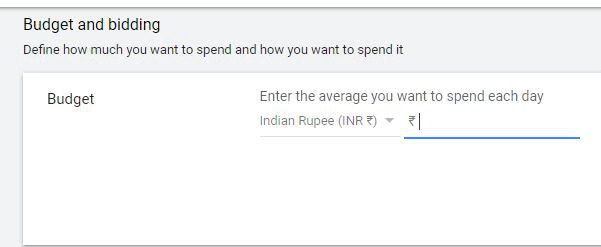
Budget
Set the average amount you want to spend per day on your campaign.
For example, if you set a daily budget of ₹300, Google Ads will try to spend close to this amount. On some days it may spend slightly more or less, but your monthly spend will stay within limits.
Delivery Method
Choose how your budget is spent throughout the day:
- Standard Delivery: Spreads your budget evenly across the day to maintain consistent ad visibility.
- Accelerated Delivery (Limited Use): Spends your budget faster to show ads as early as possible. This option is rarely recommended in 2026 due to smart bidding optimisations.
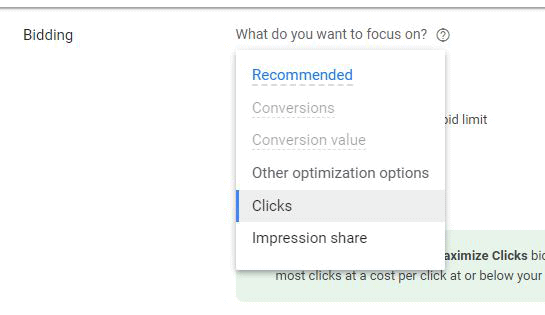
Bidding Strategy
Select what you want to focus on:
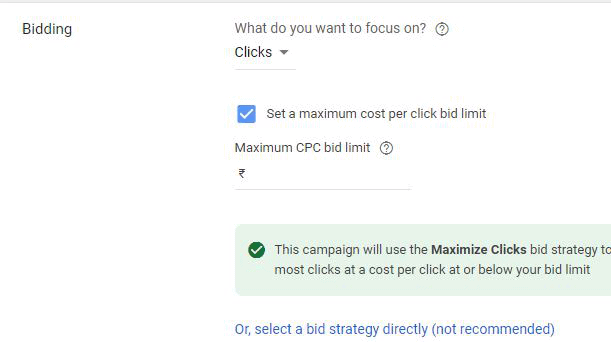
- Clicks: Drive traffic to your website
- Conversions: Encourage users to complete specific actions
- Conversion Value: Maximise revenue from ads
If you choose Clicks, Google will automatically adjust bids to get the maximum number of clicks within your budget.
Budget Explanation (Example)
Assume your daily budget is ₹100.
If your average Cost Per Click (CPC) is ₹10, your ad can receive up to 10 clicks per day.
- Day 1: 5 clicks → ₹50 spent
- Day 2: 10 clicks → ₹100 spent
- Day 3: 8 clicks → ₹80 spent
Google Ads adjusts daily spend based on traffic availability but ensures your total monthly spend does not exceed the set limit.
Note: Always choose your budget based on your campaign goals, competition, and business capacity.
Ad Extensions
Ad extensions help enhance your ads by adding extra information and improving visibility.
Common ad extensions include:
- Sitelink Extensions
- Callout Extensions
- Call Extensions
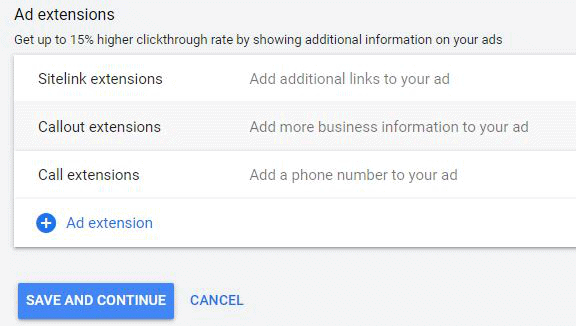
If you do not want to add additional details to your ad, you can skip this step.
After completing this section, click Save and Continue.
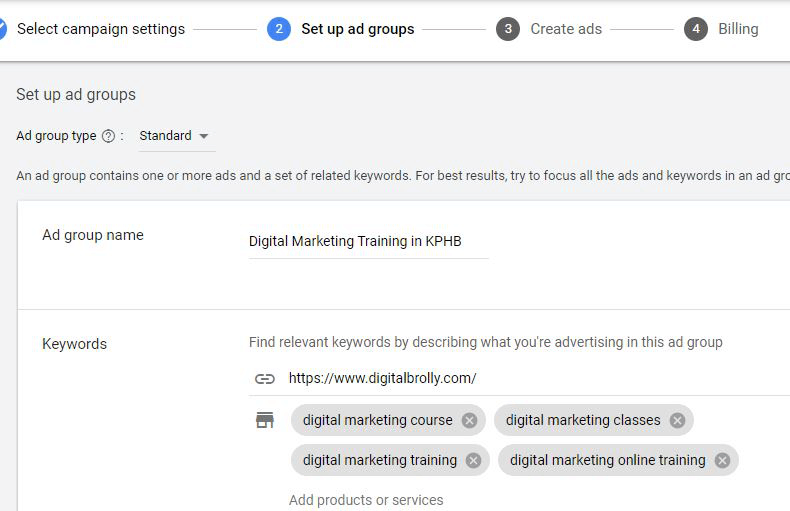
Step 2: Set Up Ad Groups
Ad group-1
Ad group name- Digital Marketing Training in KPHB
Ad Group 2: SEO Training in Hyderabad
Ad Group Name
Set the ad group name as SEO Training in Hyderabad to clearly define the theme.
Add Relevant Keywords
Include keywords closely related to SEO training services.
Example keywords:
- SEO Institutes in Hyderabad
- Best SEO Training in Hyderabad
- SEO Course in Hyderabad
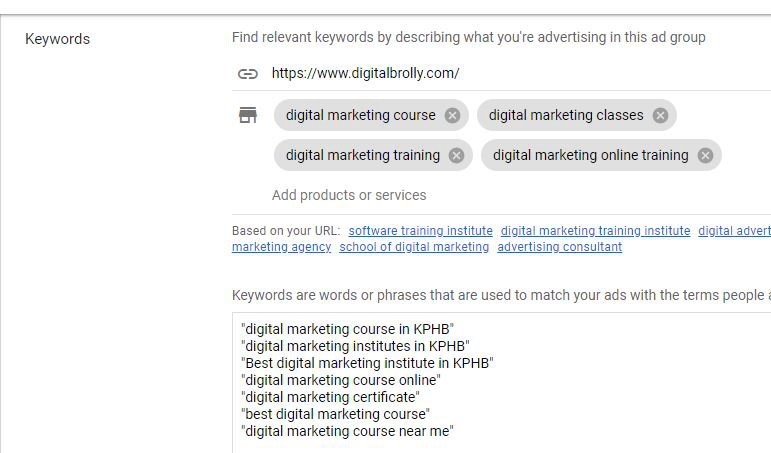
Ad group-2
Ad group name- SEO training in Hyderabad
Same here too, add some relevant keywords
Ex- SEO institutes in Hyderabad
Best SEO training in Hyderabad
SEO course in Hyderabad
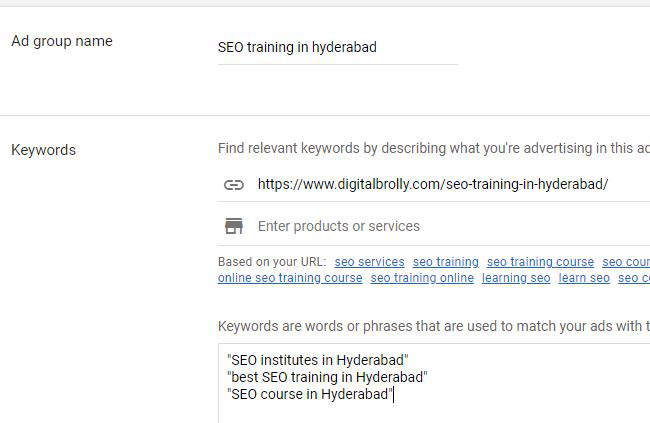
For better targeting, use Phrase Match for most keywords (e.g., “SEO institutes in Hyderabad”) and Exact Match for high-intent keywords (e.g., [SEO course in Hyderabad]).
After adding the keywords, click Save and Continue.
Note: Creating multiple ad groups is optional. You can create one or more ad groups based on different services or keyword themes.
Step 3: Create Ads
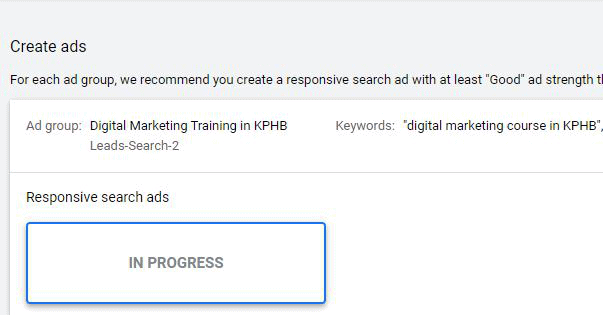
Create Ad – Digital Marketing Training in KPHB
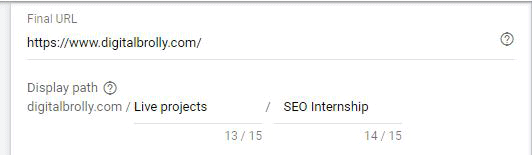
Final URL- https://www.digitalbrolly.com/
Display path- You can add any keywords here, it shows beside your ad.
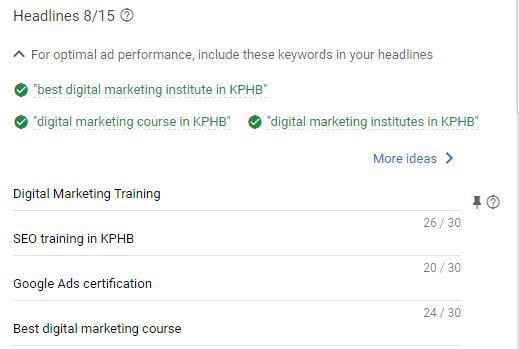
Heading-1
Heading-2
Heading-3
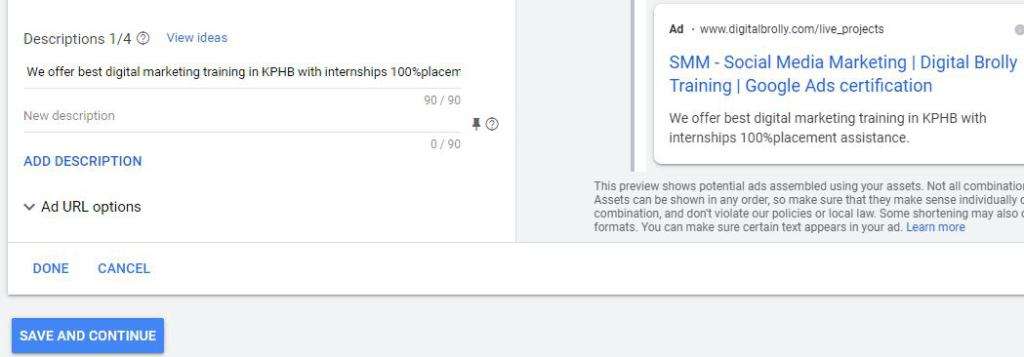
Description 1 – Write creative description by using relevant keywords. Character limit is 90. Description 2 – Same as above.
After completing all the details check the preview for both mobile and desktop. And finally click on Done.
Create Ad 2 – SEO Training in Hyderabad
Final URL- https://www.digitalbrolly.com/seo-training-in-hyderabad/
Heading-1
Heading-2
Heading-3
Display path- You can add any keywords here, it shows beside your ad.
Description 1 – Write creative description by using relevant keywords. Character limit is 90.
Description 2 – Same as above.
Check the preview of the Ad and click on Done.
Click on Save and Continue.
Step 4: Set Up Billing
Once all ad setup steps are completed, the final step is billing.
Enter the required payment details to activate your Google Ads campaign.
After billing is set up successfully, your campaign will be reviewed and prepared to go live.
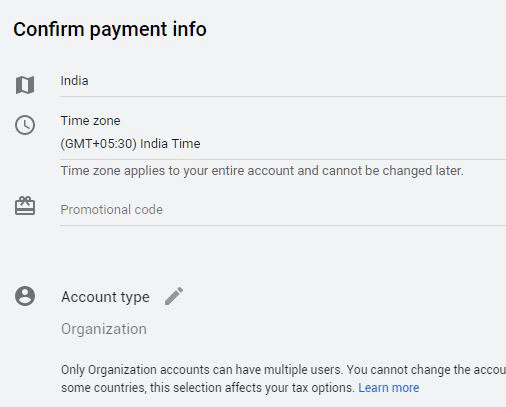
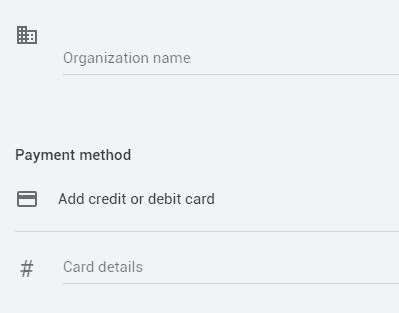
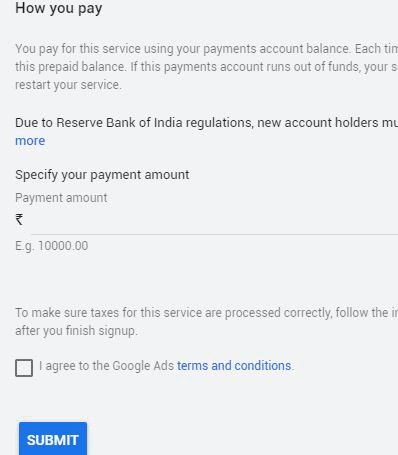
After submitting your ad, it will be sent to Google for review. The Google Ads team checks whether the ad complies with Google’s advertising policies before approval.
Once the review process is complete, your ad will be approved and eligible to start running.
Throughout this process, you can edit and update your ad content based on your campaign type and requirements.
Google Ads also provides ready-made ad templates to help you create effective ads quickly. You can explore these templates directly within the platform.
Free Google Adwords Tutorial - FAQ's
Google Ads is Google’s online advertising platform that allows businesses to promote products or services across Google Search, YouTube, Maps, Gmail, and partner websites by targeting users based on intent and behaviour.
Google Ads works through an auction system where advertisers bid on keywords, and Google ranks ads based on bid amount, ad relevance, quality score, and user intent.
Businesses earn money by converting ad traffic into leads or sales. Profit depends on conversion rate, product pricing, ad quality, and campaign optimisation.
There is no fixed budget. You can start with a small daily budget and scale based on performance, competition, and business goals.
Google Ads targets users with active search intent, while Facebook Ads focus on interest and behaviour. Google Ads works best for high-intent leads and conversions.
Google Ads is not a waste when campaigns are properly structured, targeted, and optimised. Poor setup and tracking lead to wasted spend.
People who are in or regularly visit your targeted locations (recommended).
Google Ads appear on Google Search, YouTube, Google Maps, Gmail, Discover, Google Shopping, and the Display Network.
Creating a Google Ads account is free, but advertisers pay when users click, view, or take action on ads.
Google Search Ads help businesses reach customers exactly when they are searching for related products or services.
Google Ads is worth it when campaigns are optimised with the right keywords, bidding strategy, tracking, and landing pages.
Paid search is highly effective because it targets users with strong intent and delivers fast, measurable results.
Google Ads campaigns can be paused, edited, or stopped anytime without penalties.
Yes, Google Ads can run without a website using call ads, lead form ads, app ads, or Google Business Profile integrations.
Google Ads is beginner-friendly, but mastering it requires practice, testing, and understanding bidding, keywords, and analytics.
Quality Score is Google’s rating of your ad relevance, keyword quality, and landing page experience, which affects ad rank and cost per click.
Smart Bidding uses machine learning to automatically adjust bids in real time to maximise clicks, conversions, or conversion value.
Performance Max is an AI-driven campaign type that runs ads across all Google networks from one campaign based on conversion goals.
Responsive Search Ads allow multiple headlines and descriptions, and Google automatically shows the best-performing combinations.
Ad rank determines your ad position and is calculated using bid amount, Quality Score, ad relevance, and expected impact of extensions.
CPC (Cost Per Click) is the amount you pay for each click on your ad.
CPA (Cost Per Acquisition) is the average cost to generate one conversion, such as a lead, sale, or signup.
ROAS (Return on Ad Spend) measures revenue generated for every unit of ad spend.
Negative keywords prevent ads from showing for irrelevant searches, helping reduce wasted spend and improve targeting.
Google Ads is beginner-friendly, but mastering it requires practice, testing, and understanding bidding, keywords, and analytics.
Most ads are reviewed within a few hours, but some may take up to one business day, depending on policy checks.
Google Ads does not guarantee results; performance depends on targeting, offer quality, landing pages, and optimisation.
Conversion tracking measures actions users take after clicking ads, such as purchases, calls, or form submissions.
Google Ads is highly suitable for small businesses because budgets, targeting, and campaigns can be fully controlled and scaled.
Google Ads works very effectively for local businesses by targeting specific locations, search intent, and local audiences.